Top
Flickr
Wednesday
Jul182012

Dropbox photos integration

A major new feature in the latest PhotoMeta version is Dropbox integration. It's now easy to browse through your Dropbox photos while PhotoMeta extracts all possible metadata including focus points, histograms and GPS info. And although Dropbox has no native support for RAW photos, in PhotoMeta they work in the same way as JPEGs. In combination with the new full screen mode, it's now a breeze to scroll through your Dropbox RAW photos. 
In order to make the Dropbox browsing experience as smooth as possible, the metadata is extracted while the full image is downloaded.

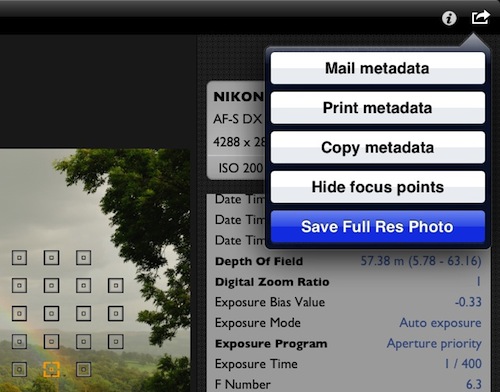
While implementing Dropbox support I found out that there's a missing feature in the Dropbox app that a lot of photographers complain about. It's not possible to save a full res photo with the Dropbox app. The "Save" action imports a reduced size photo. It's comparable to what iTunes syncing does. And not only is the photo reduced in size, a lot of the metadata is stripped too.

Time for PhotoMeta to come to the rescue. When you browsing through your Dropbox photos, importing the full res photo is just 2 taps away.


I have to add though that this feature is limited to JPEG photos. Not that it's technically challenging to get the RAW photos, but for third party apps it's just not possible on iOS to import RAW photos. You can count on it that saving full res Dropbox RAW photos will be added as soon as a new iOS version allows it.

Sunday
Jul152012

Accessibility (VoiceOver)

My freshly released PhotoMeta app is the first one that has decent accessiblity support. And to be honest, I'm quite embarrased about that. This feature has been on the todo list of all my apps for a very long time, but I always found other features to be more important. That was a mistake.

All my apps are photography related and I assumed that blind and visually impaired people were not into photography. Man, was I wrong. In April I was contacted by Susan Krieger with the request to follow the Apple guidelines regarding accessibility to make my PhotoMeta app work more completely with VoiceOver gestures. I promised her to add it in the next version and she became an enthousiastic beta tester.

It turned out that adding VoiceOver support was pretty easy. Accessibility support is now a top priority for all my other apps and I encourage other app developers to do the same.

Wednesday
Jun062012

App sales revisited

About a year ago I posted detailed app sales. Let's see how things evolved in the last 12 months.

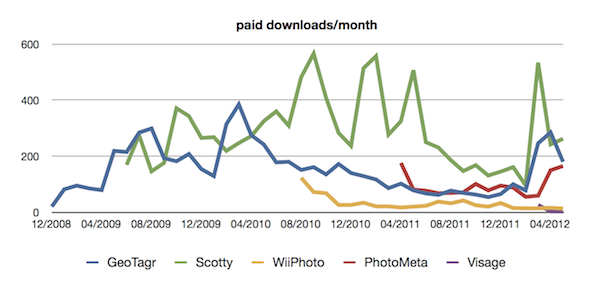
GeoTagr (blue)

Spikes are no longer caused by major new releases. The biggest spike in the last months came from the Aperture Expert Live Training 017. It's too early to see where the downward trend after the April ad campaign will stop. But the slow decline in sales that lasted for about 18 months was stopped with a big spike. 

Scotty (green)

In the fall of last year the price went from $1.99 to $2.99, but probably the major cause of the downward trend from June 2011 until March 2012 was the announcement and introduction of the Photo Stream feature in iOS 5.
Just as in the past, Scotty sales are subject to huge spikes. Example: The latest mention on macstories.net resulted in 100 downloads in just 2 days. Scotty seems to have the biggest potential but how do I give it traction? The fear I had that the introduction of Photo Stream in iOS 5 would make Scotty totally obsolete was wrong. Overall promotion and the ad campaign in March have given it some new oxygen.

WiiPhoto (yellow)

A sleeping app. I don't expect major sales bumps. But with approx. 1 download per day, it still makes a couple hundred dollars a year.

2 new apps introduced: PhotoMeta (red) and Visage (purple)

PhotoMeta was initially free with a $2.99 in-app purchase but became a paid app (also $2.99) in January. The graph shows the number of paid downloads (in-app purchases before January). The ad campaign in April certainly had its effect and May was even a better month. There is a pretty significant PhotoMeta update in the makes which will make the app interesting for a larger audience.

Visage sales numbers are very disappointing (32 downloads in 3 months), but hopefully this will change after today. Visage is part of the June 2012 AppEvent and is free just for today. Hopefully that will give it a significant boost.

Lessons learned

The lessons learned from my year-ago post are still valid, but there are some new ones.

Adding features is no longer enough. I worked full time on my apps for 4 months with several app updates going live. There was no impact on downloads whatsoever. That changed a lot once I started promoting the apps. The golden rule that you need a good app in the first place is still true. But promotion/marketing (in whatever form) is also essential.


Monday
Jun042012

My favorite iPhone and iPad apps

It would be rather silly to put my own apps or wildly popular apps in the list, so I limit my choice to third party apps I like a lot and that deserve a bit of extra attention.

Easy Calendar (iPhone) - $1.99

Without a doubt the most used app on my iPhone. A calendar app on steroids. The main focus of the app is to get a task done in as little taps as possible. Solid as a rock and regular useful updates. I can't imagine ever going back to the default Calendar app.

Articles (iPhone) - $2.99

Wikipedia in your pocket with a beautifully designed interface. The developer of this app won a well-deserved Apple Design Award for Articles. Haven't tried the iPad app yet, but it's probably as awesome as the iPhone one.

Snapseed (iPhone & iPad) - Currently free but be fast

There are a gazillion photo editing apps available, but Snapseed is certainly one of the most intuitive. It features a minimalistic, touch-oriented interface. Personally I favor the iPad version. In the first place because that's where I import my photos (via the Camera Connection Kit).

Trainyard (iPhone & iPad) - $0.99

The only game in the list. I'm not into gaming at all, but this one caught my attention when I saw my children play with it. It's a highly addictive puzzle app that does a great job in the learn-as-you-go section.

Shazam (iPhone) - Free

Amazing piece of technology that recognizes any song you hear on the radio in a couple of seconds. With a useful link to the iTunes Store if you're interested in buying the song. Free with ads. Also available for iPad, but I haven't used that version yet.

Lonely Planet Guides (iPhone) - $5.99 a piece

Not really one app, but a huge collection of apps. The perfect travel companion. If you are into traveling certainly check them out. 

FreezePaint (iPhone) - $0.99

Only available since a couple of weeks but I beta tested this app and had a lot of fun with it. It's hard to describe FreezePaint, you have to see it. It's a one of a kind app that's only limited by your imagination. 

Remote (iPhone & iPad) - Free

This one's made by Apple, but doesn't ship with an iPhone or iPad by default. If you hate cables like me, you're going to love Remote. Browse your iTunes library from anywhere in the house. With the built-in AirPlay support the possibilities are endless if you have an Apple TV or any other AirPlay enabled device.

Monday
May142012

To Android or not to Android

Now and then I get a request from someone to make one of my apps available on Android. So far I never considered developing for non-iOS platforms (Android, WP7, BlackBerry) and I have no plans to change this any time soon. Why?

How it all started

Back in 2008 I was looking for a GPS dongle to geotag my photos, an iPod and a new mobile phone. Around that time, Apple launched the iPhone 3G (the first iPhone with a built-in GPS) and the App Store. I decided to buy an iPhone 3G and in my spare time, I made my own photo geotagging app that I also started selling through the App Store.

How it went on 

Developing iPhone apps for the App Store turned out to be a really fun and fascinating hobby. And a cheap one too compared to that other hobby of mine, photography. Besides buying the iPhone 3G, the only other cost was the yearly iPhone Dev Program fee (99$). Mid 2009 the cost of the iPhone 3G was totally compensated by the GeoTagr sales!

I discovered a new hobby that made me some money instead of costing me money. On top of that I got a lot of satisfaction from selling my own stuff worldwide. And I could do it at my own pace. Besides the regular app updates, I launched about one new app a year:

  • 12/2008: GeoTagr
  • 06/2009: Scotty
  • 08/2010: WiiPhoto
  • 04/2011: PhotoMeta
  • 03/2012: Visage

In 2010 the iPad was launched and in order to properly test my iPhone and iPad apps, I had to buy extra hardware. I currently have an iPod touch, iPhone 3G, iPhone 4, iPhone 4S, the original iPad and the new iPad. That's 6 devices to target an iOS audience of over 360 million users. And 5 of those 6 devices are used on a daily basis by my family members. They're not hidden in a drawer until I have to do some app testing. 

Also important to know is that I cover more than 99% of that huge iOS market by supporting just iOS 4.2 and iOS 5.

Add Android to the party?

In the past years I've followed Android very close. I'm not married to Apple and although I'm a long time Mac user, I don't consider myself an Apple fanboy. 

I constantly ask myself: What would change for me if I would start developing Android apps? With an installed base that exceeds iOS it looks tempting at first sight, but:  

  • None of the existing iOS code can be reused, so I have to build Android apps from scratch.
  • To cover more than 90% of the Android market I have to support 6 Android versions (2.2, 2.3, 3.0, 3.1, 3.2, 4.0)
  • I need to buy a lot of hardware to have a decent coverage when testing my apps. 400 devices is probably a bit over the top, but I'm not going to cut it with 6 devices either.
  • The total amount of money paid to Android devs is less than 10% of the total amount paid to iOS devs.

I don't see any good reason to start developing for Android. Supporting 6 OS versions and testing on a lot of hardware is not really my definition of fun. On top of that there's no guarantee that app sales will compensate for the hardware I have to buy. That could mean that I don't break even for Android.

I also keep reading stories of Android devs that confirm all the above. The latest one I read was from the guys at Avatron.

The future

There are no signs that the Android situation will change any time soon, so I won't bring my apps to Android in 2012.

If you're an Android dev I'm looking forward to your thoughts in the comments.